
Three ways to add a signature
Draw your signature with a finger for a handwritten look, type your name and pick a script font, or import a signature image you already have. Save it once, and the next document takes a single tap.
Sigvo is a PDF signer for Android that adds your signature to any document without a computer, a printer or an account. Open a file, place a signature, and export a finished PDF.
To sign a PDF on Android, open the file in Sigvo, tap to add a signature, draw or type it, drag it into place, and export the signed PDF. The whole flow runs on your phone, offline.
1 free PDF export per day · no ads · no watermark
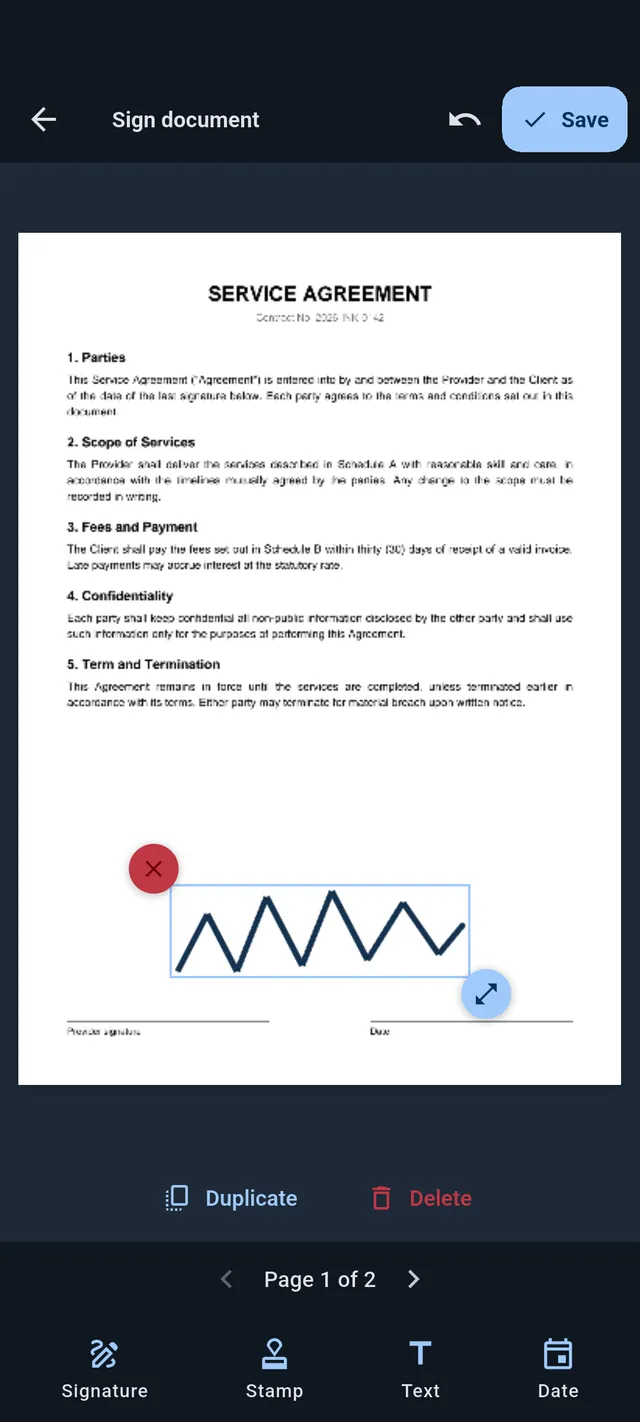
Draw your signature with a finger for a handwritten look, type your name and pick a script font, or import a signature image you already have. Save it once, and the next document takes a single tap.
Drag the signature across the page, pinch to resize, and rotate it to match the line. Snap guides help you line it up, and undo reverses any step.
Move between pages and sign each one, or apply the same placement to every page at once. Add initials, a stamp or a date wherever the form needs them.
The exported PDF has your signature baked in, with no watermark and no ad. Share it straight back to email or chat, or save it to your device.
Install Sigvo, open a document, and export a signed PDF before your coffee gets cold.
1 free PDF export per day · no ads · no watermark
Sigvo adds a visual signature to your documents. It is not a substitute for a qualified electronic signature service, such as an eIDAS qualified e-signature or your country's legally certified electronic signature.